Wedding Vendor List and Payment Tracker: 7 Fields That Matter
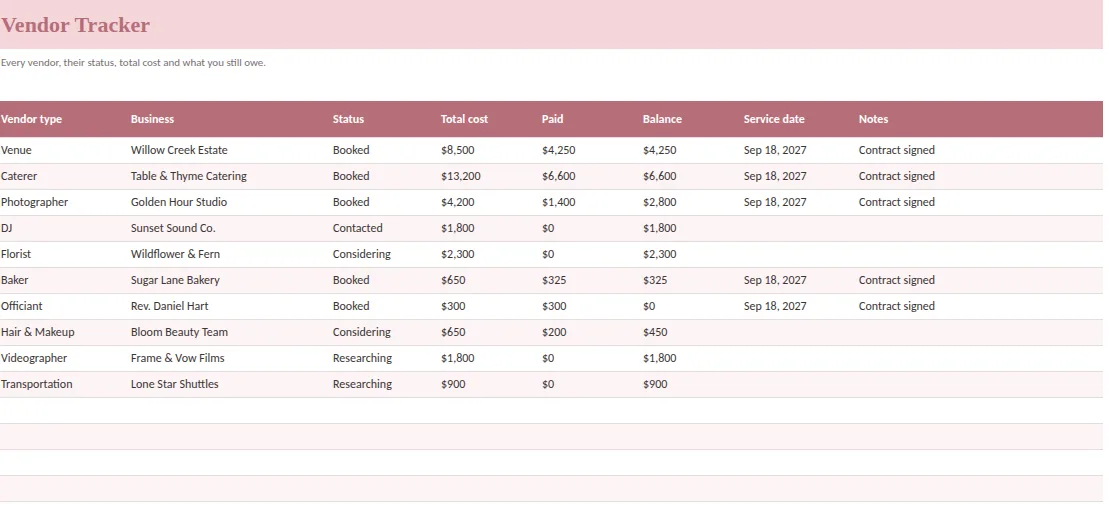
A wedding vendor list is a control panel, not an address book. It tells you who you have booked, what they have agreed to provide, how much is paid, how much is owed and who answers the phone on the day. When it is complete, a missing florist or a forgotten balance cannot hide.
Here are the seven fields that make a vendor list useful, a method to compare quotes before you sign and a payments view that keeps every deposit on schedule.
1. Service role and scope
List the roles your wedding needs: venue, catering, bar, photography, video, music, flowers, cake, attire, hair and makeup, transportation, officiant, rentals and coordination. They are possibilities, not an obligation to hire all of them. Some roles may be covered by the venue, a package or a friend.
Beside each role, write what is included and what is not. A caterer's proposal may include staff but not rentals. A venue package may include a sound system but no one to run it. A role marked "booked" with an open question inside is the kind of gap that appears on the wedding day.
2. Business and event contact
Record the business name and the person handling your event, with a phone number and an email. The person who sold the package is often not the person who will be there, so confirm the operational contact before the final handoff.
Share a short contact sheet with the person helping on the day. They need a way to reach each vendor, not every proposal or private payment note.
3. Status and next action
Use a few consistent stages: researching, contacted, considering, booked. Add the next action in the notes: send the inquiry, ask for an updated scope, schedule a call, review the agreement. A status alone does not tell you what moves things forward.
Do not mark someone booked because they said they were interested. Use the confirmation process agreed with that vendor, and keep the signed agreement or written confirmation where you can find it.
4. Total commitment
Record the agreed cost, and where the quote is still incomplete, note what is still awaiting a figure. Compare on the same basis. Hours, staffing, delivery, equipment, taxes and setup can make two apparently similar totals very different.
Keep planning estimates separate from commitments. When an agreement changes, update the total and add the reason. This matters most when an upgrade affects both the vendor balance and another budget category.
5. Payments and balance
Each deposit, installment and final payment is a line with an amount, a due date, a status and a date paid. Record them against the commitment instead of treating them as new costs. A scheduled payment is not a paid one, so keep the two apart.
A tracker usually calculates Balance = Total cost − Paid. A payments list with a "days until due" counter and an "Overdue" flag does the rest. Sort by due date monthly so you see which weeks are heavy.
6. Service date and logistics
Add the service date, arrival time and anything that determines access: loading dock, parking, a rental team that must finish first, setup restrictions. If the florist cannot enter until the rental team has left, that dependency belongs in the schedule, not in someone's memory.
7. Final handoff owner
Name the person who will answer questions on the day and tell them what decisions they can make. Give that person a dated contact sheet and the day-of schedule. If an invoice is still pending, decide who will settle it, and when.
Comparing quotes before you sign
Put quotes side by side in one table. A minimum set of columns:
| Column | Example of what to write |
|---|---|
| Type | Photographer |
| Vendor | Name of business |
| Quote | Total including fees |
| Hours or scope | Hours of coverage, full-day setup |
| What is included | Second shooter, gallery, prints, delivery |
| Style | Warm and editorial, bright and airy, moody |
| Rating (1 to 5) | Your score after the call |
| Decision | Favorite, backup, no |
Seeing three photographers on one screen is a different experience from reading three PDFs. You notice the gap in coverage hours, the missing gallery, the delivery fee. And you can show your partner the choice in ten seconds.
Tips and service charges
Tips and service charges are budget items. Check each contract for service charges already included, then decide which vendors you intend to tip and give each a line. The goal is not to guess at a number but to avoid being surprised by one.
Monthly vendor routine
- First week: review statuses and next actions.
- Before each due date: confirm the payment and note the method.
- After each payment: update Paid and keep the receipt.
- Six weeks out: confirm service dates, arrival times and contacts.
- One week out: send the contact sheet and the schedule to everyone who needs it.
What a finished tracker feels like
Six weeks before the wedding, you open the tracker and every row is booked, every balance has a due date and every vendor has a contact for the day. You are not hunting through emails or wondering whether the second payment went out. You send one tidy contact sheet to your coordinator and the rest of your evening is yours.
That quiet is what the seven fields buy you. None of them is complicated, but together they remove the small uncertainties that otherwise pile up into wedding-week anxiety.
A ready-made option
Ever After Planner gives you the three vendor tabs and the payments list in one file. The Vendor Tracker records type, business, status, total cost, paid, balance, service date and notes. The Vendor Contacts tab keeps the operational details. The Vendor Comparison tab holds quotes side by side with scope, inclusions, style, rating and decision. The Payments tab holds each installment with due date, status, date paid and method, and flags what is overdue or due soon. The Dashboard shows the total paid and the remaining balance.
It works in Excel, Google Sheets and Numbers and ships with sample vendors so you can see each formula work before entering your own. For how the payments connect to your overall plan, see the wedding budget template guide.
This guide is general planning information. Your vendor agreements set the actual terms, deadlines and fees.