Wedding Budget Template: The Columns That Keep You on Track
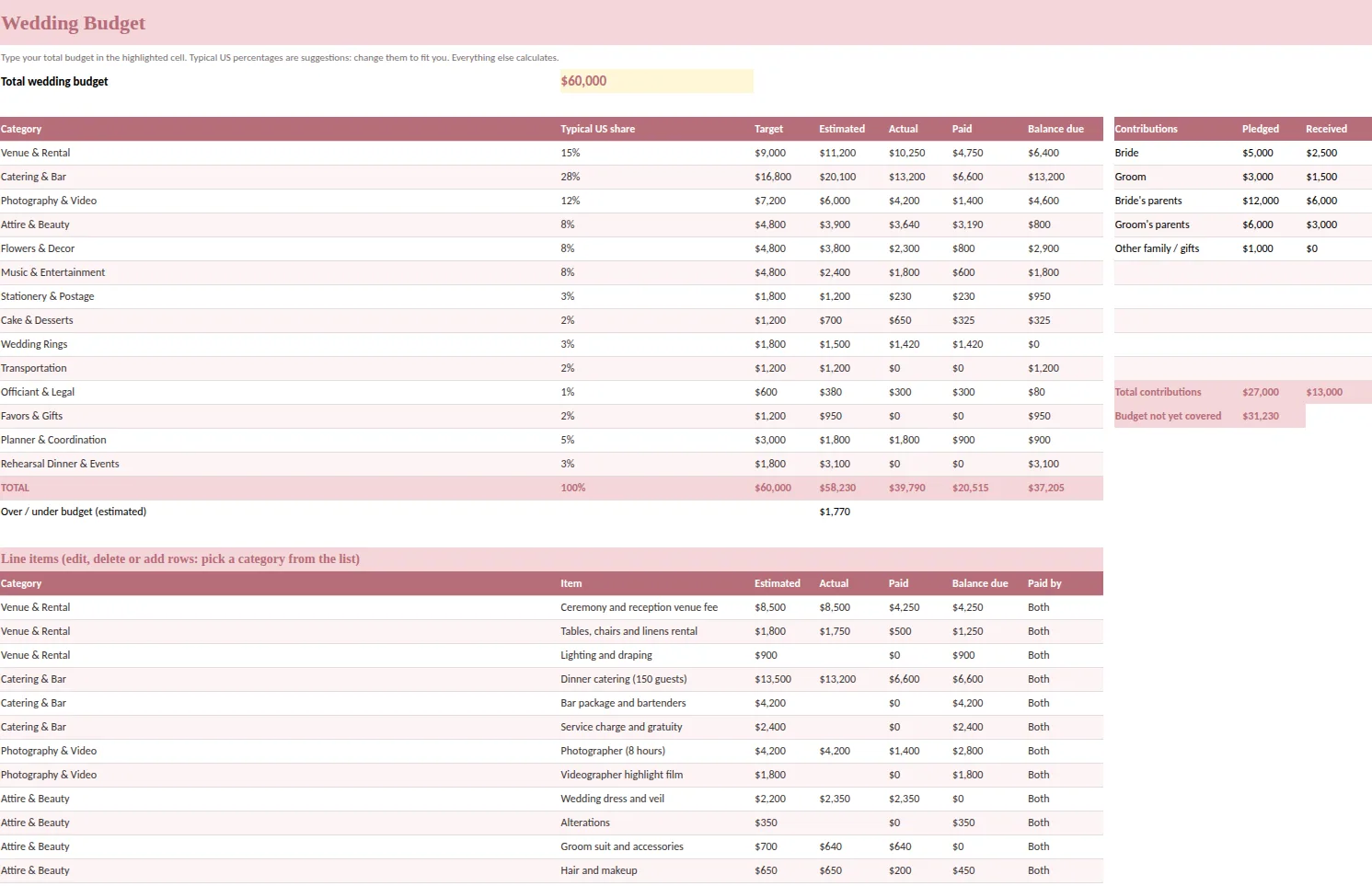
The best wedding budget template tracks three numbers for every line: what you expect to spend, what you have agreed to spend and what you have already paid. A single "cost" column cannot do that, which is why so many budgets look fine until the final invoices arrive.
This guide covers the columns to demand, how to set a template up in Excel or Google Sheets, and the habits that keep the total under control from the first deposit to the last tip.
Why one "cost" column fails
Imagine a venue listed at one figure. Is that a quote, a signed contract or a paid deposit? If your template cannot tell the difference, your total mixes guesses with commitments. Later a rental fee appears, the cake grows by a tier and the florist adds a delivery charge, and the sheet quietly stays the same because nobody knew where to put the change.
Three columns solve it:
- Estimated is your forecast while you research. It is allowed to be wrong.
- Actual is the number in the agreement. It replaces the estimate once you sign.
- Paid is money that has left your account. The difference is your balance due.
The columns to look for
| Column | What it answers |
|---|---|
| Category | Where does this belong: venue, catering, photography, attire, flowers, music, stationery? |
| Item | What exactly is the cost? |
| Estimated | What do we expect? |
| Actual | What did we agree? |
| Paid | What has left the account? |
| Balance due | What do we still owe? |
| Paid by | Who is covering it: you, your partner or family? |
Add a total at the bottom of each, and a line that shows over or under budget. That one line is the reason you open the file.
A realistic category split
Percentages are a starting point, not a rule. Venue and catering usually take the largest share, followed by photography and video, then attire, flowers and music. Smaller categories such as stationery, cake, rings, transportation, favors and the officiant add up faster than people expect.
In the Ever After Wedding Planner, the budget tab lists 14 categories with a typical share for each: venue and rental, catering and bar, photography and video, attire and beauty, flowers and decor, music and entertainment, stationery and postage, cake and desserts, rings, transportation, officiant and legal, favors and gifts, planner and coordination, and rehearsal dinner and events. You type a total and the target for each category is calculated. As quotes arrive, you replace the typical share with the real number and see which categories are above their target.
Set up your wedding budget template step by step
- Agree the total with your partner and anyone contributing. Write it down before looking at venues.
- List who is contributing. A contributions table (you, your partner, each set of parents, gifts) shows pledged and received amounts and tells you how much of the budget is not yet covered.
- Enter the category targets. Use percentages, then adjust to your priorities. If photography matters more than flowers, say so now.
- Add line items under each category. Venue fee, rentals, linens, service charges, taxes, tip.
- Fill in estimates only. Leave Actual blank until you sign.
- Replace estimates as you sign. Enter the Actual figure and a note on what is included.
- Record each payment. Use the Paid column or a separate payments list with due dates.
- Look at the variance every week. If one category is over its target, decide where to take it from.
The costs most templates forget
- Service charges and taxes added to a catering or venue quote.
- Gratuities for vendors who are tipped.
- Alterations, shipping and postage.
- Overtime if the evening runs long.
- A buffer line of a few percent for the things you will think of later.
Give each its own row. A hidden cost is only a surprise because it did not have a place.
Link the budget to your payments
A budget tells you how much; a payment schedule tells you when. When both are in the same file, a deposit entered once appears in both places. Our vendor tracker guide shows how the two fit together, and the wedding budget spreadsheet guide goes deeper into formulas and monthly cash flow.
Habits that protect the total
- Update the sheet the day you sign or pay. Not on Sunday.
- Never delete an old estimate; change the number and add a note.
- Ask for the full price including fees before comparing quotes.
- Decide the trade-off rule in advance. If something goes over, what shrinks?
- Review it together once a week, ten minutes.
A worked example of the three columns
Say the florist's first proposal is the figure you typed as an estimate. Two weeks later you sign a smaller package and add a delivery fee: the Actual cell now holds the signed total, with a note that says what it covers. You pay a deposit, so the Paid cell shows that amount and the Balance due falls to the remainder. Nothing was deleted, the estimate is still visible for comparison and the summary at the top moved by itself.
Do that for twenty lines over six months and you hold something rare in wedding planning: a budget you can trust at any hour. When a parent asks how things are going, you answer with a number, not a feeling. When a vendor raises a price, you see at once which category absorbs it. And when the final invoices arrive, nothing is a surprise, because every line has been through the same three states.
The calm comes from the routine, not from the size of the budget. A modest wedding with a tidy sheet feels easier than a large one tracked in someone's head.
A ready-made option
Ever After Planner includes this budget tab together with the payments tab, a contributions table for family gifts, a vendor tracker and a dashboard that shows the budget, estimate, actual, paid and remaining amounts at a glance. It works in Excel, Google Sheets and Numbers, includes sample rows so you can see how each column behaves, and comes with printable pages for the budget meeting with family.
This guide is general planning information, not financial advice.