Wedding Guest List Template: RSVP, Meals and Table Assignments
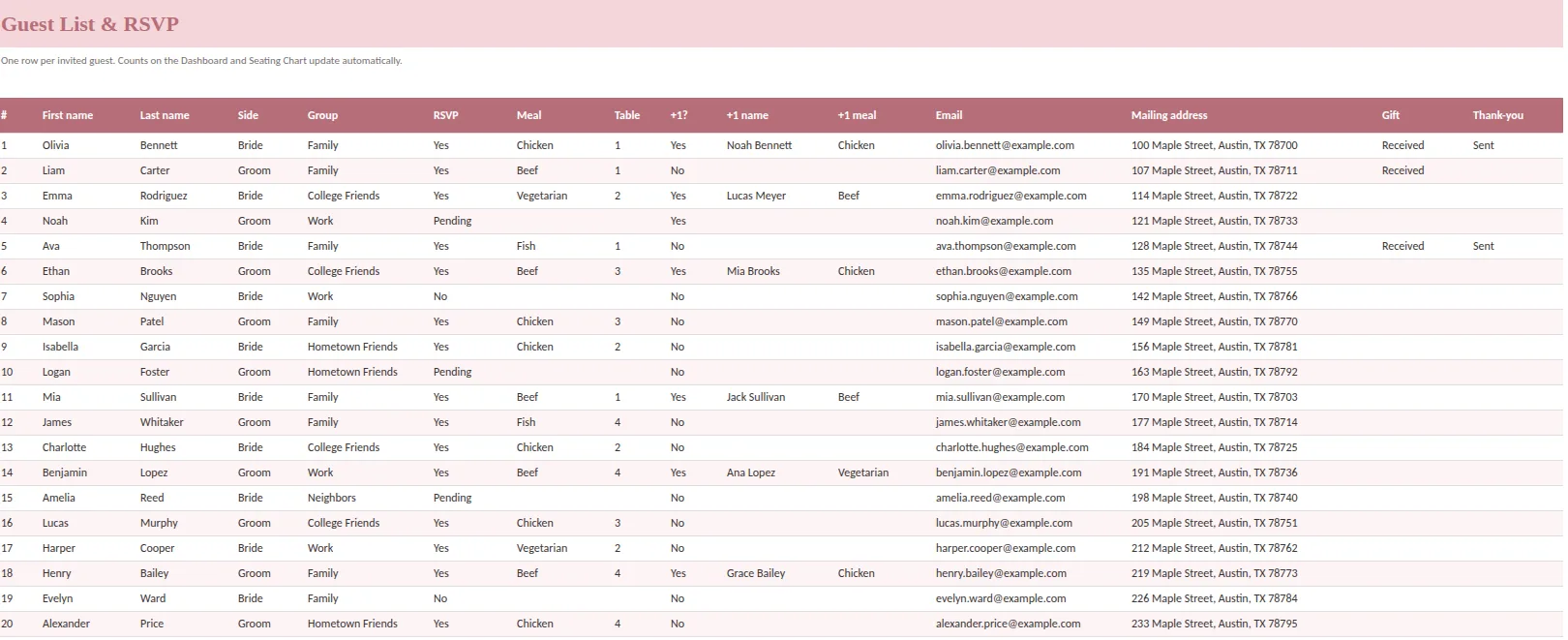
A wedding guest list template should do more than store names. Done well, it tells you who has replied, what everyone is eating, who sits where, which gifts arrived and who still needs a thank-you note. All of that from one row per person.
This guide sets out the columns worth having, the formulas that produce your final numbers and a simple workflow for keeping the list accurate from first draft to final headcount.
Start with one row per person
Households receive invitations; people attend weddings. A household with two invited adults has two rows, because one may say yes, the other no, and each may order a different meal. If you use one row per household, a single "yes" hides a missing meal choice or an unconfirmed partner.
You can still keep the household together with a shared address and contact. What matters is that the unit you count is the person.
The columns to include
| Column | Why it matters |
|---|---|
| First and last name | Sorting, name cards, thank-you notes |
| Side | Bride, groom or both: keeps the split visible when a venue or family asks |
| Group | Family, college friends, work, hometown. Helps you cut or seat by group |
| RSVP | Yes, No or Pending: the three states you count |
| Meal | The exact options your caterer uses |
| Plus-one and plus-one name and meal | A companion who is counted with the primary guest |
| Table | The seat assignment that feeds the seating chart |
| Email and mailing address | Invitations, updates and thank-you notes |
| Gift and thank-you | Received and sent: avoids forgetting anyone |
A drop-down on RSVP, meal, side and gift status keeps the words consistent. The totals only count exact matches, so "yes", "Yes" and "Y" are three different answers to a formula.
The formulas that give you your final numbers
You do not need many.
- Invited: count the rows with a last name.
- Yes, No, Pending: COUNTIF on the RSVP column.
- Attending: the Yes rows plus any plus-ones counted with them.
- Meal counts: COUNTIFS where RSVP is Yes and the meal equals each option. Add up the plus-one meals too.
- Guests per table: COUNTIFS on the table column.
Once these exist, the numbers your caterer asks for are a reading, not a project.
A workflow that stays accurate
- Draft the full list early. Include the maybes. Mark the side and group. This is when you size the venue and the catering quote.
- Create tiers. An A list of must-invite people and a B list you invite if declines come in. Use a column or a color.
- Send invitations and mark them as sent. Date it, so you know when to follow up.
- Update every reply within a day. Not in a batch before the deadline.
- Chase the Pending rows two weeks before the RSVP date, with a short message that asks for the missing detail.
- Assign tables only for Yes guests. Keep uncertain guests visible so they do not silently take a seat.
- Reconcile before the final count. Accepted guests, assigned guests and meal totals should agree. If they do not, find the difference.
Plus-ones without double counting
There are two ways to record a companion, and mixing them is the most common error.
- Plus-one fields on the primary guest's row. The companion's name and meal sit next to the guest, and the companion is counted at the same table when the RSVP is Yes.
- A separate row for the companion. Then set the plus-one field to No on both rows.
Use separate rows when the companion needs a different table or a separate RSVP. Otherwise, use the fields. Never do both for the same person, or they are counted twice.
Privacy and sharing
Your caterer needs meal counts, not the list of addresses. Your seating helper needs tables and names, not private notes. Make a stripped copy for each, with only the columns each person needs, and keep the master where only the two of you edit it.
After the wedding
Keep the same list for gifts and thank-you notes. A Gift column (Received, not received) and a Thank-you column (Sent) turn the last chore of the wedding into a checklist you can finish in a weekend. Send them while the memory is fresh.
Make the list easier to cut
Almost every couple has to trim the list at some point. Add a priority column with three levels (must invite, would like to invite, if space) and sort by it. When the venue limit or the budget demands a cut, you can see exactly who is in each tier and the effect on the totals. It also takes the emotion out of the conversation, because the criteria were agreed in advance rather than at the last minute.
Count children, vendors who will eat and your own party as separate groups, so the headcount you give the caterer is complete. A small note beside the venue limit on the dashboard keeps the number in front of you.
A ready-made option
Ever After Planner includes a Guest List and RSVP tab with room for 200 guests: first and last name, side, group, RSVP, meal, plus-one name and meal, table, email, mailing address, gift and thank-you columns, all with drop-downs. The Dashboard reads it to show invited, yes, no, pending, plus-ones coming and total attending, plus meal counts. The Seating Chart tab reads the table numbers to show seated and open seats per table, and meal counts per table.
It works in Excel, Google Sheets and Numbers, includes sample guests so you can see the formulas react, and comes with printable pages for the final headcount meeting. See the seating chart guide for how the two tabs work together, and the wedding planning spreadsheet guide for the rest of the file.
This guide is general planning information. Confirm the final-count deadline and meal rules in your own vendor agreements.